What Is YAML, and Why Use It Instead of JSON?
YAML is a human-friendly data format for config files. Here's how it compares to JSON, why developers pick it, and the traps that catch beginners.
YAML is a plain-text data format designed to be easy for people to read and write, and it's most often used for configuration files. Developers choose it over JSON when humans will edit the file by hand, because YAML drops most of the brackets, braces, and quotes, and it allows comments, which JSON does not. JSON is still the better choice when programs exchange data with each other. This guide explains what YAML looks like, how it compares to JSON line by line, and the few gotchas that trip up almost everyone the first time.
What YAML stands for#
YAML officially stands for "YAML Ain't Markup Language", a recursive name chosen to make the point that it's a format for data, not for marking up documents like HTML. The current version is YAML 1.2, published in the official YAML specification. You'll see files ending in either .yaml or .yml; both extensions mean the same thing.
What YAML looks like next to JSON#
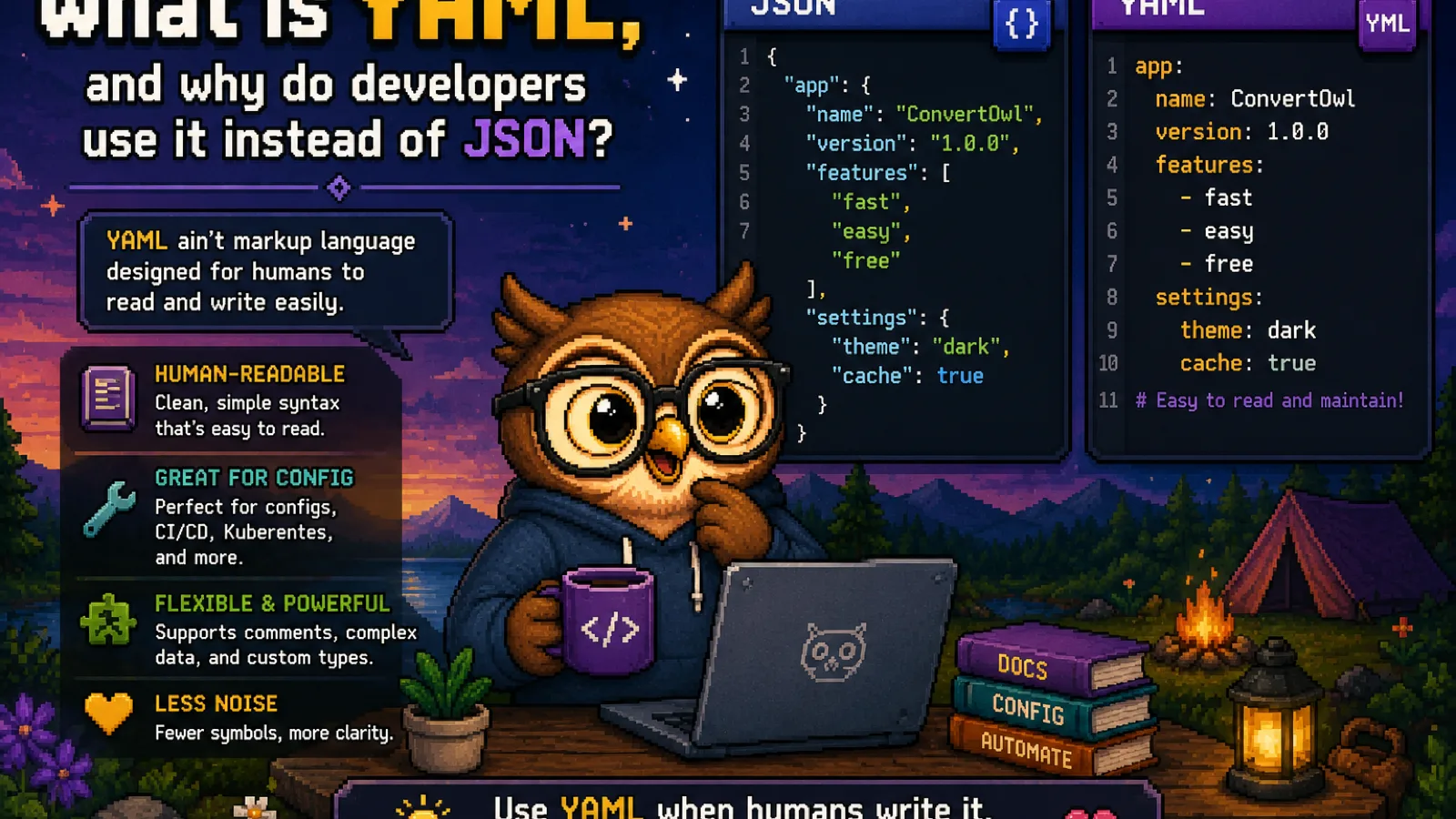
Here's the same small piece of data in both formats. First, JSON:
{
  "app": {
    "name": "ConvertOwl",
    "version": "1.0.0",
    "features": ["fast", "easy", "free"],
    "settings": {
      "theme": "dark",
      "cache": true
    }
  }
}
And the YAML version:
app:
  name: ConvertOwl
  version: "1.0.0"
  features:
    - fast
    - easy
    - free
  settings:
    theme: dark # comments are allowed
    cache: true
The structure is identical: an object called app with a name, a version, a list of features, and a nested settings object. The difference is how it's written:
- Indentation replaces braces. In YAML, nesting is shown by indenting lines with spaces. JSON uses
{ }and[ ]. - Lists use dashes. Each
-line is one item in a list. - Quotes are mostly optional. Plain words like
darkdon't need quotes, although you can still use them. - Comments work. Anything after a
#is ignored. JSON, as defined in RFC 8259, has no comment syntax at all.
Why developers use YAML instead of JSON#
YAML's advantages all come down to one idea: it's built for files that people write and maintain by hand.
- It's easier to read. With less punctuation, the actual keys and values stand out, which matters in a config file you return to months later.
- You can leave comments. Explaining why a setting exists, or temporarily disabling a line, is routine in config files and impossible in plain JSON.
- Fewer syntax errors from punctuation. There are no trailing commas to forget or misplace, a classic JSON mistake.
- It can avoid repetition. YAML anchors (
&name) and aliases (*name) let you define a block once and reuse it elsewhere in the same file. - Long text is easier. A
|keeps line breaks in a multi-line string exactly as written, and a>folds the lines into one paragraph.
That's why YAML is the standard format for so many developer tools. Kubernetes manifests, Docker Compose files, GitHub Actions workflows, and Ansible playbooks are all written in YAML.
Why JSON is still everywhere#
YAML didn't replace JSON, and it isn't meant to. JSON wins whenever the main reader is a program rather than a person:
- Browsers read it natively. JavaScript can turn JSON text into data with the built-in
JSON.parse()method. YAML always needs an extra library. - It's simpler and stricter. JSON has very few rules, so every parser behaves the same way. YAML's specification is much longer, and parsers don't always agree on edge cases.
- It's the language of APIs. Most web APIs send and receive JSON, so data that travels between services is almost always JSON.
In practice, many projects use both: YAML for the config a person edits, JSON for the data machines pass around. Since YAML 1.2 was designed so that JSON is (very nearly) valid YAML, moving data from one to the other is usually painless. If you need to feed a YAML config into something that only accepts JSON, the YAML to JSON converter does it in your browser. For a broader look at choosing a data format, see our comparison of CSV vs JSON.
Common YAML gotchas#
YAML's flexibility comes with a few traps worth knowing before you write your first file:
- Tabs aren't allowed for indentation. YAML indentation must use spaces. A file indented with tabs will fail to parse, even if it looks fine in your editor.
- Indentation is meaning. Shift a line two spaces and it can silently move into a different object. There's no closing brace to catch the mistake.
- Values can change type unexpectedly. Unquoted values are guessed:
truebecomes a boolean and1.10becomes the number 1.1, losing its trailing zero. Quote anything that must stay text, such as version numbers, which is why the example above writesversion: "1.0.0"in quotes. - The "Norway problem". Parsers that follow the older YAML 1.1 rules treat words like
no,yes,on, andoffas booleans, so a list of country codes containingNOfor Norway can turn intofalse. YAML 1.2 dropped those extra boolean words, but not every parser follows 1.2, so quoting is the safe habit.
A quick way to see exactly how a parser reads your YAML is to convert it to JSON and look at the result. Strings, numbers, and booleans are unambiguous in JSON, so a stray false or a missing trailing zero shows up immediately. Paste the output into the JSON formatter to check its structure, and browse the text and data tools hub for related converters such as XML to JSON.
Frequently asked questions#
What is YAML in simple terms? YAML is a plain-text format for storing structured data, like settings and lists, in a way that's easy for people to read and edit. It uses indentation instead of brackets, and it's most commonly used for configuration files.
What does YAML stand for?
YAML stands for "YAML Ain't Markup Language", a recursive name meaning it's a format for data rather than for marking up documents. The .yaml and .yml file extensions are interchangeable.
Is YAML better than JSON? YAML is better than JSON for files that people write and edit by hand, such as configuration, because it's more readable and supports comments. JSON is better for data exchanged between programs and APIs, because it's simpler, stricter, and built into every browser.
Can YAML have comments?
Yes, YAML supports comments: anything after a # on a line is ignored. JSON has no comment syntax, which is one of the main reasons developers prefer YAML for config files.
Is JSON valid YAML? Almost always, yes: YAML 1.2 was designed so that JSON documents are valid YAML, so a YAML 1.2 parser can read nearly any JSON file. The reverse isn't true, because YAML features like comments and anchors have no JSON equivalent.
How do I convert YAML to JSON? You can convert YAML to JSON by pasting it into a converter such as the ConvertOwl YAML to JSON tool, which runs in your browser and outputs formatted JSON you can copy or download. Anchors and aliases are expanded into full values along the way.
The short version#
- YAML is a human-friendly data format, used mainly for configuration files.
- It uses indentation instead of braces, dashes for lists, and allows
#comments. - Choose YAML when people edit the file; choose JSON when programs exchange the data.
- Indent with spaces only, and quote values that must stay text, like version numbers or
NO. - Convert with the YAML to JSON converter, check the result in the JSON formatter, and read more in our technology articles.
Try the tools
Free, private, and instant. Everything runs in your browser.