What Is Base64 Encoding, and Why Do Websites Use It?
Base64 turns any file into plain text. Here's how it works, why websites embed images with it, why it makes files a third bigger, and when to skip it.
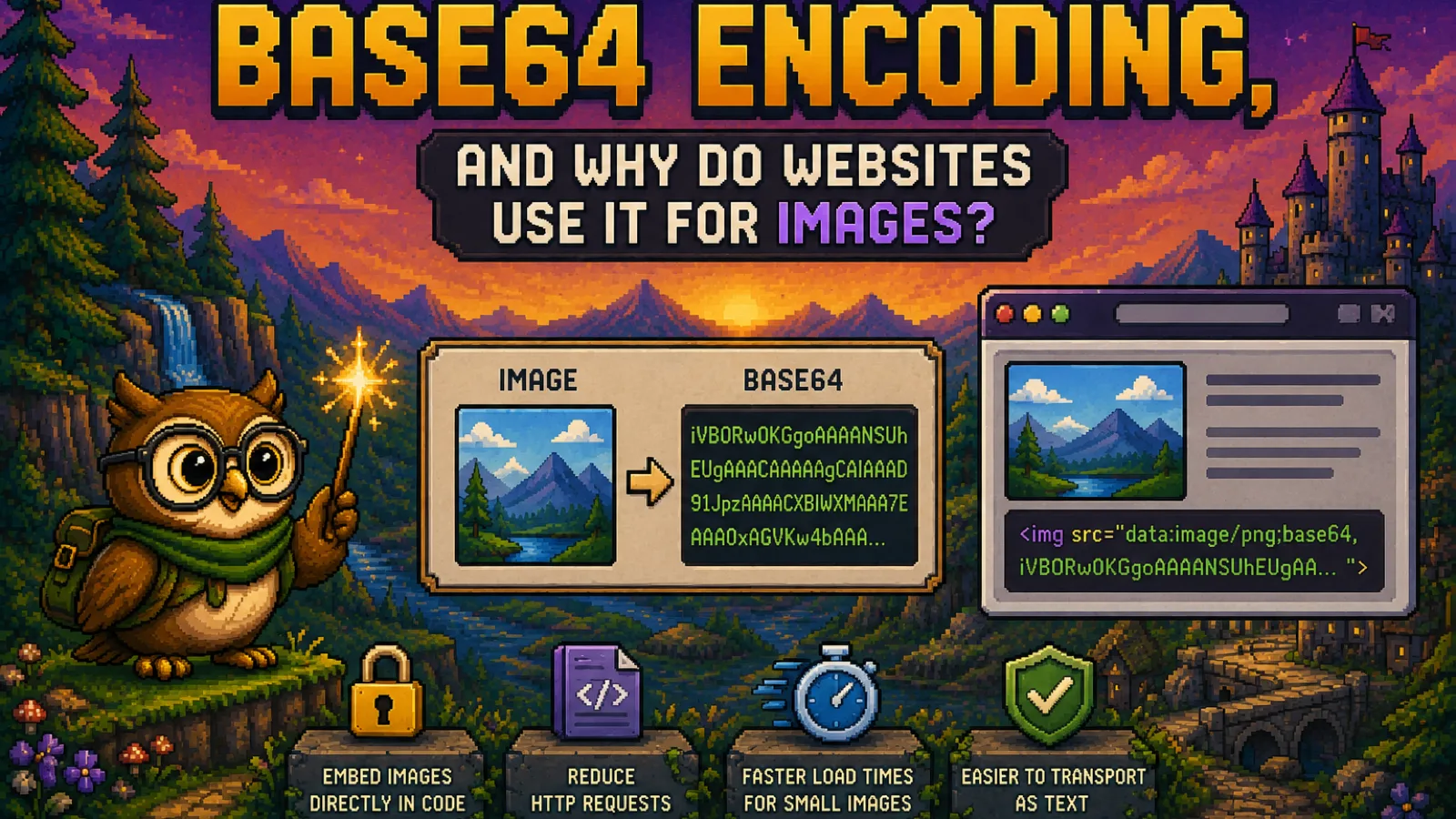
Base64 encoding is a way of writing any binary file, such as an image, as plain text made of just 64 safe characters: the letters A to Z and a to z, the digits 0 to 9, and + and /. Websites use it for images because the resulting text can be pasted straight into HTML, CSS, or JSON, so a small icon arrives inside the page instead of as a separate download. The catch is size: Base64 text is about a third larger than the file it represents. This guide explains how the encoding works, where it actually helps, and when a normal image file is the better choice.
What Base64 encoding actually does#
Computers store an image as raw bytes, and many of those bytes don't correspond to printable characters. That's a problem for anything designed to carry text: an HTML attribute, a CSS file, a JSON field, or an email body. Base64 solves it by re-expressing the bytes using only characters that survive any text system unchanged.
The method is defined in RFC 4648, the standard most software follows. It works in small groups:
- Take 3 bytes of the file (24 bits).
- Split those 24 bits into 4 chunks of 6 bits each.
- Each 6-bit chunk is a number from 0 to 63, so look it up in the 64-character alphabet.
The classic example is the word Man. Its three bytes become the four characters TWFu. If a file's length isn't a multiple of 3, the output ends with one or two = signs as padding, which is why so many Base64 strings end in = or ==.
One thing Base64 is not is encryption. Anyone can decode it instantly, with no key or password. It only changes how data is written down, not who can read it.
Why Base64 makes files about 33% bigger#
Because every 3 bytes become 4 characters, Base64 output is always about 4/3 the size of the input, roughly 33% larger. That's plain arithmetic, not an estimate:
| Original file | As Base64 text |
|---|---|
| 3 KB | about 4 KB |
| 30 KB | about 40 KB |
| 300 KB | about 400 KB |
| 3 MB | about 4 MB |
Some systems also insert a line break every 76 characters (email does this, as described in RFC 2045), which adds a little more. Text compression on the web server (gzip or Brotli) claws some of the overhead back, but an encoded image never ends up smaller than the original file.
How websites use Base64 for images#
On the web, Base64 images almost always appear as a data URL: the image itself written into the place where a link to it would normally go. The format, documented on MDN's data URL page, looks like this:
<img src="data:image/png;base64,iVBORw0KGgoAAAANSUhEUgAA..." alt="Logo">
The same thing works in CSS, for example as a background image:
.icon {
  background-image: url("data:image/png;base64,iVBORw0KGgoAAAANSUhEUgAA...");
}
The browser reads the text, decodes it back into the original PNG, and shows it exactly as if it had downloaded a separate file. To get this snippet for your own picture, drop a JPG, PNG, WebP, or AVIF into the image to Base64 converter and copy the ready-made img tag, CSS rule, or raw string.
When Base64 images are a good idea#
Embedding an image as text makes sense in a handful of specific situations:
- Tiny icons and UI graphics. A small icon inlined in your CSS arrives with the stylesheet, so it can't flash in late or fail to load on its own.
- Self-contained files. A single HTML file, an email template, or a document you want to work without any external files can carry its images inside it.
- Data that has to travel as text. JSON APIs, config files, and clipboard snippets can't hold raw bytes, so images in them are usually Base64. Email attachments are Base64 under the hood for the same reason.
- Quick prototypes and demos, where you'd rather paste one string than host an image somewhere.
When to avoid Base64 images#
For most images on a real website, a normal image file is the better choice:
- Bigger downloads. Every inlined image costs about a third more bytes than the file would.
- No separate caching. A Base64 image is cached as part of the HTML or CSS that contains it. Change one line of that stylesheet and the browser downloads the image again too, while a separate image file stays cached on its own.
- It delays the page. The image text sits inside your HTML or CSS, which the browser has to download before it can render the page. A large inlined photo slows down everything, including text that would otherwise appear first.
- Fewer requests matter less than they used to. Saving a request was the main argument for inlining, but HTTP/2 lets a browser fetch many small files over one connection, so that saving is far smaller today.
A sensible rule: inline only images that are a few kilobytes at most, and serve everything else as a regular file. For photos, the bigger win is usually shrinking the file itself, which the image compressor does in your browser. Our guide to compressing images without losing quality explains how far you can push it.
SVG is a special case#
SVG files are already text, so they don't strictly need Base64 to go into a data URL. You can URL-encode the SVG markup instead, which usually comes out smaller because it skips the 33% overhead, although Base64 is simpler and avoids any trouble with quotes and special characters. The SVG to Base64 converter gives you both versions so you can pick, and if you're unsure what an SVG actually contains, our explainer on what an SVG file is covers it.
Both converters run entirely in your browser, so your images are never uploaded. You'll find related tools in the image tools hub and the developer tools hub.
Frequently asked questions#
What is Base64 encoding in simple terms?
Base64 encoding is a way of writing any file, like an image, as plain text using 64 safe characters (the letters A to Z and a to z, the digits 0 to 9, plus + and /). It lets binary data travel through systems that only handle text, such as HTML, CSS, JSON, and email.
Why do websites use Base64 for images? Websites use Base64 for images so that a small image can be placed directly inside the HTML or CSS instead of being downloaded as a separate file. This is most useful for tiny icons and for self-contained files like email templates.
Does Base64 make images bigger? Yes, Base64 makes images about 33% bigger, because every 3 bytes of the original file become 4 characters of text. A 30 KB image turns into roughly 40 KB of Base64.
Is Base64 a form of encryption? No, Base64 is not encryption, because anyone can decode it instantly without a key or password. It only changes how data is written, not who can read it, so never use it to hide sensitive information.
When should I not use Base64 images? You should not use Base64 for large images or photos, because the extra 33% size and the lack of separate caching slow your page down. Serve them as normal image files and inline only images that are a few kilobytes at most.
How do I convert an image to Base64?
You can convert an image to Base64 by dropping it into a converter such as the ConvertOwl image to Base64 tool, which runs in your browser and gives you the encoded string plus a ready-to-paste img tag or CSS rule.
The short version#
- Base64 writes any file as text using 64 safe characters. It's an encoding, not encryption.
- Every 3 bytes become 4 characters, so the result is about 33% larger.
- Websites use it to put small images straight into HTML or CSS as data URLs.
- Inline only tiny images; serve photos and anything larger as normal files.
- Try it with the image to Base64 converter or the SVG to Base64 converter, and read more in our technology articles.
Try the tools
Free, private, and instant. Everything runs in your browser.