What Is a WebP File? Format Explained
WebP is Google's image format built for the web: smaller files than JPG or PNG, transparency, even animation. Here's how it works and how to open it.
You download a photo from a website and it lands on your computer as photo.webp. Double-click it and, on an older phone or an image viewer that's a few years out of date, nothing opens. That's a WebP file: a real, modern image format, not a broken download, and it's become one of the most common formats on the web without most people ever choosing to use it.
What WebP actually is#
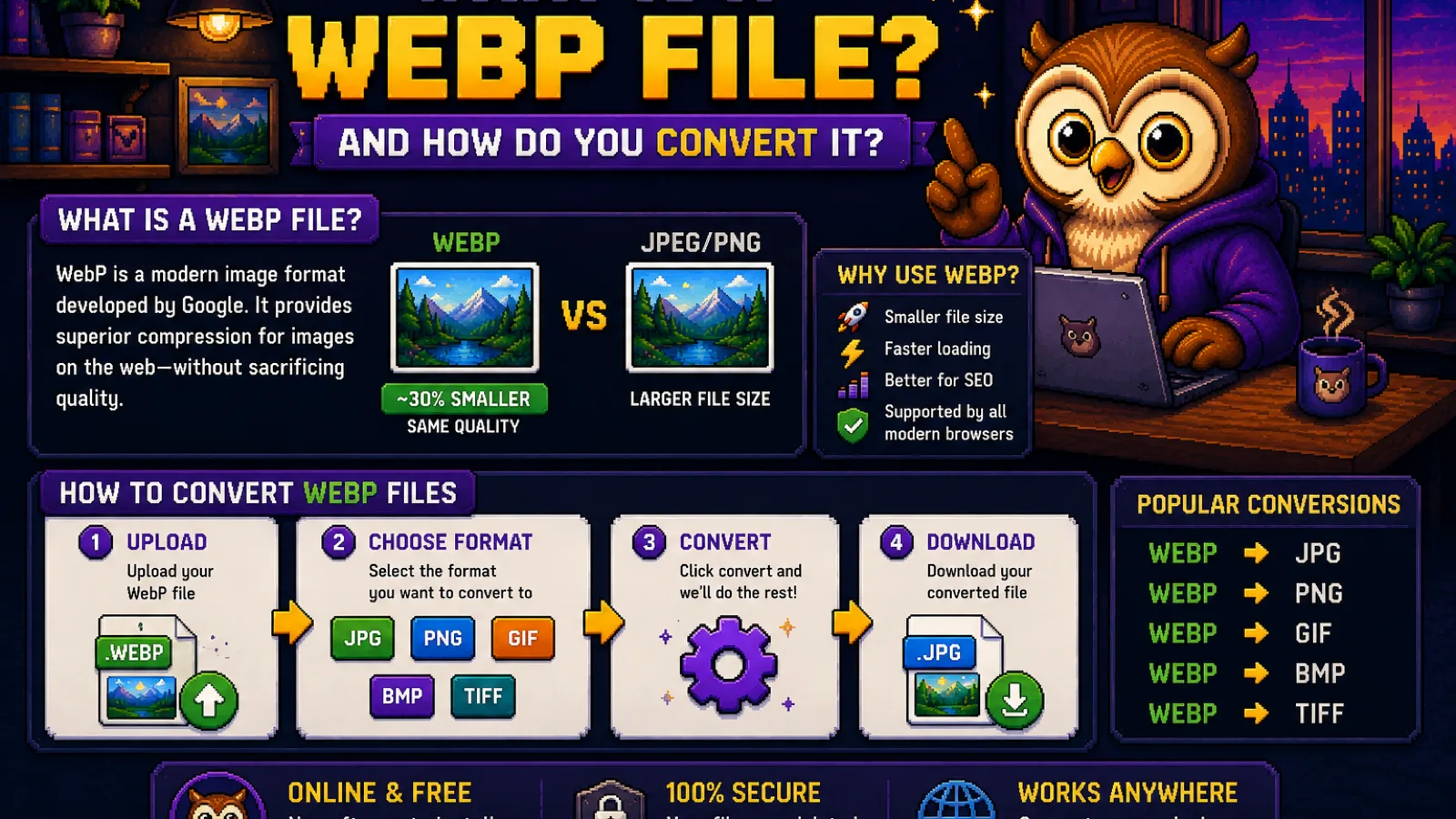
WebP is an image format created by Google in 2010, designed specifically to make web pages load faster. It does one job well: store an image in fewer bytes than JPG or PNG while looking just as good, so pages with lots of images transfer less data and render sooner.
Under the hood, WebP borrows video-compression techniques (it's built on the same codec family as Google's VP8 video format) to predict and encode pixel blocks more efficiently than JPG's older DCT-based approach. The practical result: WebP files are typically 25 to 35% smaller than a comparable JPG, and often far smaller than PNG for photographic content, at the same visual quality.
Why WebP replaced so many JPGs and PNGs#
JPG and PNG each do one thing: JPG compresses photos well but has no transparency; PNG supports transparency but compresses photos poorly. WebP does both in a single format:
- Lossy compression (like JPG) for photos, at a smaller file size for the same quality.
- Lossless compression (like PNG) for graphics, logos, and screenshots where you can't afford to lose detail.
- Alpha transparency, so a WebP can have see-through backgrounds the way a PNG does, but smaller.
- Animation support, replacing animated GIFs at a fraction of the size.
That's four formats' worth of features in one, which is why browsers, CDNs, and CMS platforms like WordPress now serve WebP by default wherever they can.
Where WebP shows up#
- Right-click "Save Image" on almost any website and there's a good chance you'll get a
.webpfile, since most CMS platforms and image CDNs auto-convert uploads to WebP for visitors. - Google Images results frequently serve WebP thumbnails and previews.
- Product photos on e-commerce sites use WebP to keep gallery pages fast.
None of this requires you to do anything: WebP just quietly reduces how much data a page sends you. The friction shows up later, when you want to use that file somewhere that doesn't understand it.
The catch: not everything opens WebP#
Browser support for WebP is now excellent: Chrome, Firefox, Safari, and Edge have all supported it for years. The gap is everywhere else:
- Older versions of Windows Photo Viewer and macOS Preview may not open WebP without an update or extra codec.
- Many older phones, printers, and embedded devices don't recognize it.
- Some design tools, presentation software, and older CMS plugins expect JPG or PNG and reject WebP uploads outright.
- Social platforms and forums sometimes fail to preview or upload a WebP correctly.
That's the one real downside of WebP: it's an excellent delivery format for the web, but a poor interchange format for anything not built in the last several years.
How to convert a WebP file#
The fix is a straightforward conversion, and it takes seconds:
- Need it as a photo you can share, print, or open anywhere? Use WebP to JPG for the smallest, most universally compatible result.
- Need to keep transparency (a logo, an icon, a graphic with a see-through background)? Use WebP to PNG instead, since converting to JPG would fill the transparent areas with a solid background.
- Going the other direction, turning your own JPGs into WebP to speed up a website you run? Use JPG to WebP.
All three run entirely in your browser at ConvertOwl: the image is decoded and re-encoded locally using WebAssembly, so the file never uploads to a server. That matters for photos you'd rather not hand to a third party, and it also means conversion starts the instant you drop the file, with no waiting on an upload bar.
WebP vs JPG vs PNG, at a glance#
| Best for | Transparency | Animation | Typical size | |
|---|---|---|---|---|
| JPG | Photos | No | No | Baseline |
| PNG | Graphics, screenshots | Yes | No | Larger for photos |
| WebP | Both | Yes | Yes | Smallest overall |
If you're comparing WebP specifically against JPG for your own photos, our WebP vs JPG breakdown covers the same quality-versus-compatibility trade-off in more depth.
FAQs#
Is a WebP file the same as a JPG? No. A WebP file uses a different, newer compression method than JPG, and produces a smaller file at the same visual quality, but the two are not interchangeable without converting one to the other first.
Can I open a WebP file on Windows? Yes, current versions of Windows 11 and recent Windows 10 updates open WebP natively in Photos, but older or unpatched systems may need an extension from the Microsoft Store or a quick conversion to JPG or PNG.
Why won't my WebP file upload to a website or app? Some upload forms and older software only accept JPG, PNG, or GIF, and reject WebP outright because they were built before the format became common; converting the file with WebP to JPG or WebP to PNG fixes this in seconds.
Does converting WebP to JPG lose quality? Converting a lossy WebP to JPG at a high quality setting causes minimal, usually invisible quality loss, since both formats are already lossy; the visible difference only becomes noticeable if you re-compress at a low quality setting.
Should I convert my WebP to PNG or JPG? Convert to PNG if the image needs transparency or is a graphic, logo, or screenshot; convert to JPG if it's a photo and you want the smallest possible file with no transparency needed.
Is WebP better for websites than JPG? Yes for page speed: WebP files are typically 25 to 35% smaller than an equivalent-quality JPG, which reduces page weight and improves load times, and every major browser now supports it.
Whatever the reason you've got a .webp file that won't cooperate, converting it takes one drag-and-drop. Try WebP to JPG or WebP to PNG, free, private, and instant, or browse every file-format guide on the blog.
Try the tools
Free, private, and instant. Everything runs in your browser.